


Most AI SEO advice assumes your query is being searched. A lot of it isn't.
If you've read the fan-out piece, you know AI doesn't use one query. It decomposes prompts into hidden sub-queries before it touches the open web. If you've read the SRO piece, you know that even when your page gets shortlisted, the model judges an extracted passage in isolation and picks a winner.
Here's the thing both of those pieces assume: that the model is actually retrieving from the web in the first place. For a lot of queries, it isn't. It's answering from training data, and your content isn't even in the room.
That's the split I said I'd come back to in the SRO article. This is that piece.
The industry has spent the last eighteen months building dashboards that track whether you appeared in AI answers. A lot of them are monitoring the same static prompts every day, prompts the model is often answering straight from memory, where no amount of on-page optimisation, fan-out mapping, or passage rewriting will change a single thing.
Before fan-out. Before SRO. Before you brief a rewrite or commission a content sprint, there's one question worth asking first: is this query even in the game?
This article names the split, explains how to predict it, and points you at the tools, including one I built, to classify your query list before you spend budget on the wrong battlefield.
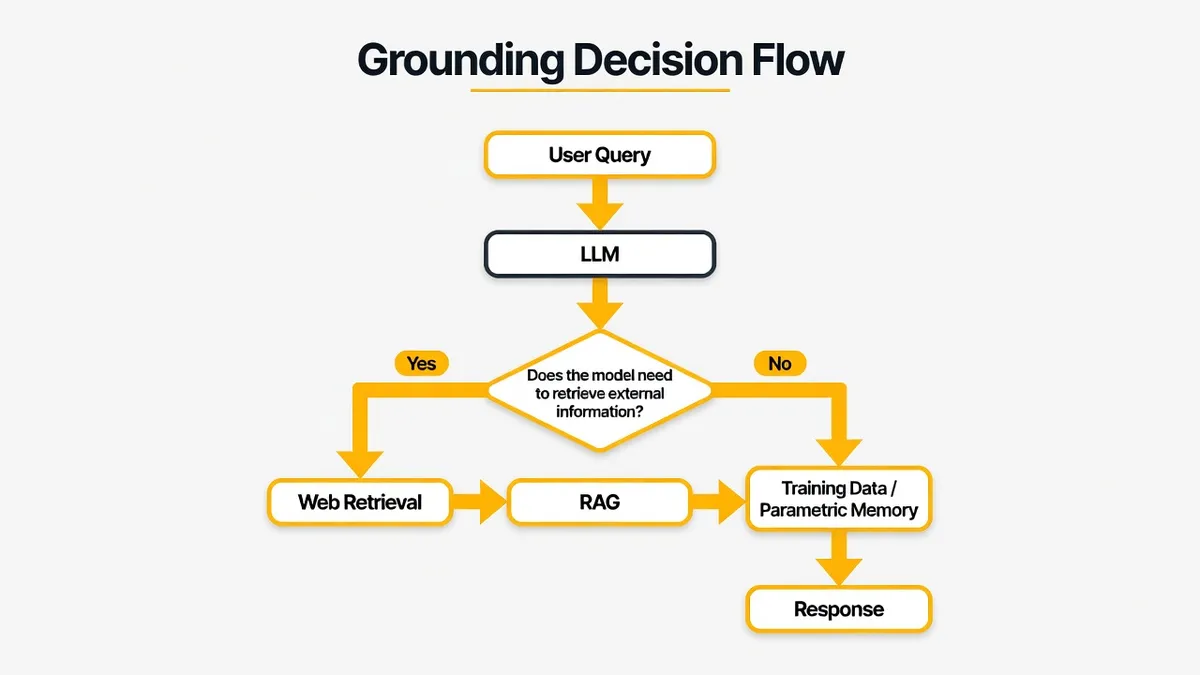
The binary decision every LLM makes before it answers you
Every time someone submits a prompt, before a single token gets generated, the model makes a routing decision.
Does it need external information? Or can it answer from what it already knows?
Grounded (retrieval-sensitive): the model goes out to the web, via Google Search, Bing, or its own index, before it synthesises an answer. Your content can enter the pipeline. Fan-out happens. Passages get shortlisted. Selection occurs. This is where everything from the fan-out article and the SRO article actually applies.
In-model (memory-led): the model answers from parametric memory, its training data. No web search. No grounding. No RAG. Your page plays no role. The model doesn't skim your content and decide not to use it. It never looks.
That's the fork. And it happens before any of the work you're used to thinking about even becomes relevant.
A few examples to make it concrete:
- "What do red blood cells do?" → In-model. Settled science. Highly consistent training signal. No freshness requirement.
- "What happened in today's news?" → Grounded. High temporal variance. The model knows it can't trust stale training data.
- "Tell me a joke about computers" → In-model. No factual retrieval needed.
- "What is the current population of India?" → Grounded. Requires up-to-date data.
- "Compare the camera specs of the Google Pixel 9 Pro and the iPhone 16 Pro Max." → Grounded. Product comparison with changeable, verifiable specs.
If you want a video walkthrough, Tom Capper's Moz Whiteboard Friday on in- and out-of-model responses is the clearest thing I've found. For the underlying mechanism, Mark Williams-Cook's Majestic piece is worth reading properly. He frames it as token prediction against a bell curve of possible answers in the training data, which is the mental model I keep coming back to.
When training data converges on a sharp, consistent answer ("what is the boiling point of water?") the model doesn't need to search. When the distribution is flat or contested ("who is the best digital marketing agency in Birmingham?") retrieval becomes the safer path.
Sharp bell curve, in-model. Flat or contested distribution, grounded. That's the whole thing.
What determines whether a query gets grounded?
You can get reasonably good at predicting this without any tools, once you know what to look for. Three signals cover most of it.
1. How quickly the answer goes out of date
If the accurate answer changes over time, the model knows it cannot rely on training data alone.
Queries with explicit time markers ("latest," "current," "2026," "this week") push toward grounding. So do event-driven queries, breaking news, pricing, market conditions, and anything where being six months out of date would be materially wrong.
Mark Williams-Cook found that ChatGPT exposes a search_prob score in network data, a number from 0 to 1 indicating how likely the model thinks search is needed. On the free tier the threshold sits around 0.65. Paid tiers ground more readily. Even within the same model family, the bar shifts. It's not a fixed rule, it's a dial that platforms turn up or down depending on their own product decisions.
2. How settled the answer is
When training data converges on one answer, the model answers from memory. When knowledge is disputed, evolving, or locally variable, retrieval wins.
"Capital of France": in-model. "Best CRM for UK estate agents": grounded, because the answer depends on market context, pricing, feature sets, and opinions that shift.
This is the bell curve signal again. High confidence in training data, no search. Low confidence or high variance, search.
3. Topic volatility and comparison intent
Product comparisons, pricing queries, competitive analysis, local business queries, and anything involving named entities that change (people, prices, rankings, regulations) all push toward grounding.
Salt Agency's framing is useful here: grounding "narrows inward toward verification," while in-model is the model operating on settled knowledge. Comparison and decision-support queries almost always need verification.
Platform note: ChatGPT free vs. paid uses different grounding thresholds. Gemini's dynamic retrieval threshold defaults to 0.3, a relatively low bar that means Gemini grounds more queries than you might expect. Perplexity grounds by default on most queries. The mechanism is universal; the thresholds are not.
The DEJAN grounding classifier: the research foundation
Before I talk about what I built, I want to give proper credit to the work this is standing on.
Dan Petrovic at DEJAN built an open-source grounding classifier designed as a replica of Google's internal "query deserves grounding" system. Michael King at iPullRank is credited with coining that phrase, and it's become the way serious AI SEO practitioners think about query prioritisation.
The DEJAN model:
- Fine-tuned Microsoft DeBERTa v3 Large
- Trained on 10,000 prompts collected via Gemini 2.5 Pro with search grounding enabled
- Binary output:
1= grounding required,0= grounding not required - Available on HuggingFace (
dejanseo/query-grounding) and via DEJAN's QDG tool
If you want ML-grade classification on a query list, that's the place to start. Dan's methodology write-up is worth reading properly before you have opinions about any of this on LinkedIn.
I'll be straight: my tool doesn't replace DEJAN's model. What it does is give you a fast, transparent rule-based check you can run in-browser without uploading a CSV anywhere, plus an optional Gemini probe to confirm whether search was actually invoked for a specific query. Different tool, different job. Use DEJAN for bulk ML classification. Use mine for quick triage and for explaining the signal to clients without a methodology doc running to six pages.
Reading the data: Microsoft Clarity's grounding queries dashboard
Theory is useful. First-party data is better. And this is where it gets genuinely interesting.
Microsoft Clarity launched AI Citations in general availability on 13 May 2026. The Citations dashboard shows page citations, share of authority, AI referral traffic, cited pages, and most relevant here: grounding queries.
Worth being clear on what grounding queries actually are, because the name is slightly misleading. They're not the terms users typed. They're the simplified retrieval phrases Copilot generates internally when it decides to pull your content into an answer. Clarity's own explainer calls them "the key phrases used by the AI when retrieving cited content." In other words: not what people searched. What the AI searched, on their behalf, to get to your page.
Practical walkthrough:
- Install Clarity and verify your domain via Bing Webmaster Tools or Google Search Console
- Navigate: Dashboards → AI Visibility → Citations
- Open the Grounding Queries view
- Compare what you thought you ranked for against what AI actually retrieves you for
One thing worth keeping front of mind: Clarity reflects Microsoft's AI surfaces, Copilot and Bing AI, not Google AI Mode, ChatGPT, or Perplexity. The structural patterns transfer. The platform-specific data does not. It's useful, just not universal.
One site covered by Search Engine Journal saw over 36,000 citations across all queries. The volume is real, even if the platform scope is narrow.
Bing Webmaster Tools: the query-to-page map
Bing Webmaster Tools added an AI Performance dashboard in February 2026 and query-to-page mapping in March 2026. Search Engine Land's coverage walks through the launch.
The useful bit: click any grounding query to see which pages it cites. Click any page to see which grounding queries drive its citations. Many-to-many mapping, both directions.
June 2026 preview added Intents (informational/commercial/navigational/local), Topics (thematic clustering), Citation Share (your proportion of citations for a given query vs. all cited sources), and Compare (time-period overlay).
Citation Share is the metric that matters for reporting. It shows what fraction of cited sources you represent within an answer, which is closer to how AI visibility actually behaves than a raw mention count.
Bing is currently the only platform with this level of native AI citation reporting. Google Search Console has AI Overview impression data but no independent citation reports or query-to-page mapping at the same granularity.
The four-quadrant framework: where your queries live
This is the bit I actually use with clients. Once you know whether a query is grounded or in-model, and whether you're being cited for it, you've got a clear action in every case. Every query in your list sits in one of four boxes:
| Grounded | In-Model | |
|---|---|---|
| You are cited | Optimise, test SRO, build fan-out clusters | Study why you're in training data. Defend the position |
| You are not cited | Highest opportunity. Close the authority/content gap | Wrong battlefield. Content optimisation won't help here |
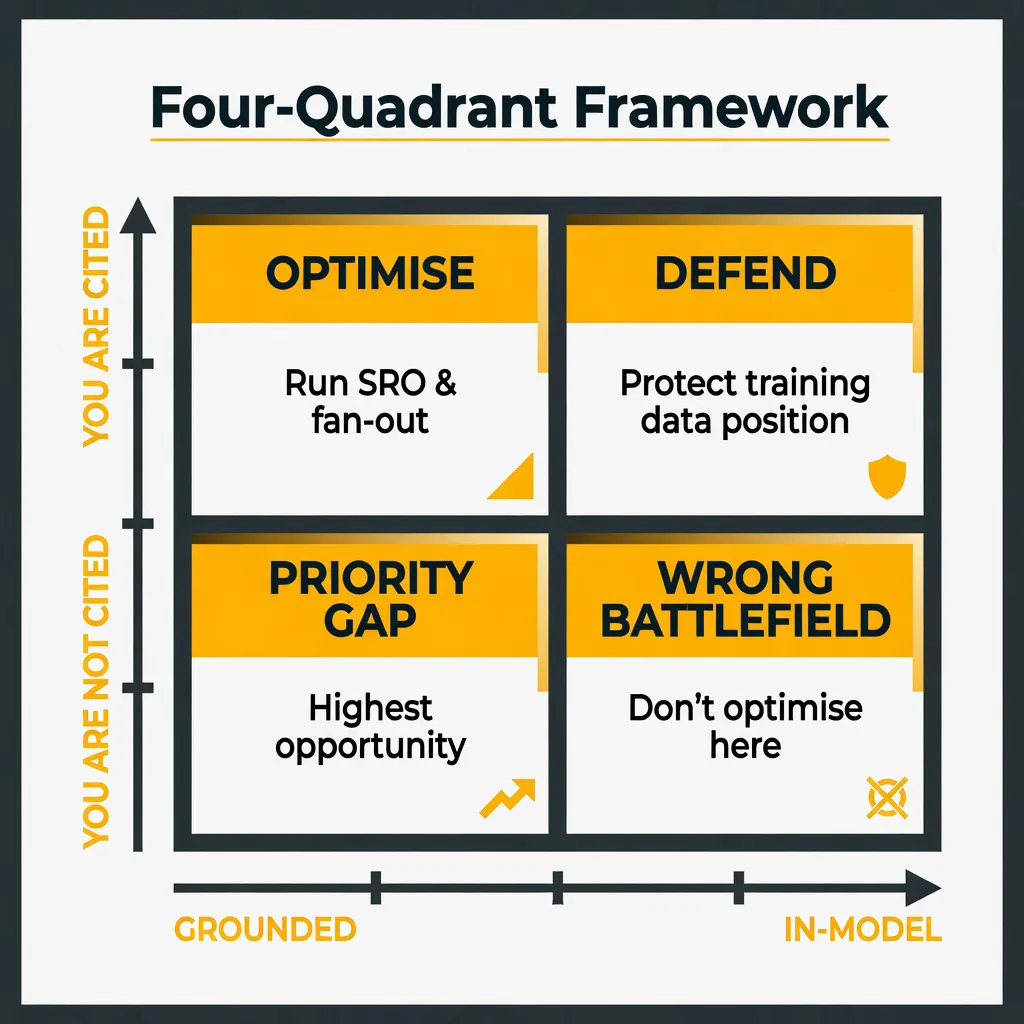
Grounded + Cited: This is where your Fan-Out and SRO work lives. Run the SRO Snippet Tester. Map fan-out clusters with the Query Fan-Out Gap Analyser. Optimise for selection, not just inclusion.
Grounded + Not Cited: Your AI SEO priority list. The query is in play. AI is retrieving from the web. You're not there. Authority gap, content gap, or structured data gap: build, improve, acquire coverage.
In-Model + Cited: You're in the training data. The risk is model updates that refresh training data and shift the answer. Protect this with entity footprint work, which I'll cover in a future piece on entity disambiguation in this series.
In-Model + Not Cited: Do not spend AI SEO content budget here. The only lever is long-term training-data influence via digital PR, high-authority mentions, and brand entity establishment. That's a 6–18 month play, not a content sprint.
Most AI visibility SaaS tools track static prompts daily. A lot of those prompts fall in the in-model quadrants. Tracking them weekly doesn't tell you whether your optimisation work is moving anything. It tells you whether the model still remembers the same answer it remembered last Tuesday. Which is genuinely not the same thing.
What the Clarity data actually reveals
Salt Agency's correlation analysis across multiple sites found some numbers that have genuinely stuck with me:
- 80.5% of grounding queries had no match in Ahrefs ranked data
- 4.5% exact GSC match, 76.5% fuzzy GSC match
- 19% had zero traditional search signal whatsoever
That 19% "pure gap" is the one I keep coming back to. These are topics where AI cites a site as authoritative but Google doesn't rank it for that query at all. The two systems are using different authority signals for a meaningful slice of the retrieval layer. That's not a rounding error. That's a gap worth knowing about.
Grounding queries also represent an essentially infinite tail of near-zero volume queries that traditional keyword tools will never surface. GSC impressions, not just clicks, are currently the best signal for whether a query is likely to be grounded when you're building a query list to classify.
How to classify your query list: four methods by technical level
Method 1: DEJAN QDG Tool (no code)
Go to dejan.ai/tool or the HuggingFace space. Paste your query list. Output: grounded / not grounded prediction per query. Best for bulk ML classification and research-grade labelling.
Method 2: ChatGPT network data (developer console)
Open ChatGPT, run a query, open DevTools → Network → find the conversation request. Look for search_prob (0–1). Threshold ~0.65 on free tier, lower on paid. Best for validating individual high-priority queries. Primary source: Mark Williams-Cook.
Method 3: Gemini Grounding API (with cost)
Call the Gemini API with Google Search grounding enabled. The API returns grounding metadata and the actual web searches it performed. Cost runs roughly $0.03 per query depending on model and search invocations. Best for building your own tooling or validating at scale with live evidence.
Method 4: The Grounding Query Classifier (this tool)
I got tired of doing this triage manually and built a free classifier to do the first pass for me. Same reason I built the fan-out gap analyser, doing it by hand for one client is fine, doing it for ten clients every month is how you end up resenting the work. It sits first in the workflow because you need a fast first pass before you commit to fan-out extraction and SRO testing.
What it does:
- Instant classification in your browser. No API key, no upload. Paste a query, get Likely Grounded / Likely In-Model / Mixed, a grounding likelihood score, confidence, and a plain-English explanation.
- Transparent signal breakdown. Freshness, locality, comparison intent, evergreen phrasing, regulated topics, and more. Each signal shows direction, weight, and why it fired.
- Mixed-query helper. Suggested subqueries you can re-classify with one click when the intent sits in the middle.
- Optional Gemini probe. Add your own API key and confirm whether Google Search was actually invoked. When the rule-based check and the probe agree, confidence increases. When they disagree, the tool leans toward Mixed.
- Copy and export. Drop results into audits or client notes.
What it doesn't do: batch CSV upload (that's DEJAN's territory), predict citations, or claim certainty across all models. It's a triage tool, not an oracle.
Privacy is the same as the rest of the series. The classification runs locally in your browser. The probe uses your own Gemini key on a BYOK basis. Nothing goes anywhere server-side.
Building the agency workflow around classification
Here's how I actually run this with clients, and the sequence the three tools in this series are built around.
- Export your query list from GSC (queries with impressions but weak AI-era performance), client keyword tracking, or fan-out analysis via the Query Fan-Out Gap Analyser
- Classify each priority query through the Grounding Query Classifier (rule-based check first, Gemini probe on high-stakes queries) or batch through DEJAN's QDG for larger lists
- Segment into Grounded (priority AI SEO work) vs. In-Model (different playbook)
- Cross with Clarity or Bing Webmaster Tools to see which grounded queries you're already cited for, and which are gaps
- Prioritise Grounded + Not Cited as your AI SEO sprint backlog
- Apply fan-out analysis to each priority grounded query. Read the fan-out article, use the Gap Analyser
- Apply SRO testing to shortlisted URLs. Read the SRO article, use the Snippet Tester
- Report the right metric. Citation rate on grounded queries, not total AI mentions across all query types
A note on reporting: "You appeared in X AI responses this month" is a number clients love and strategists should quietly be suspicious of. It could be almost entirely in-model. "Your citation rate on groundable queries is X%" is the metric that actually connects to work you can do something about. That's the number worth building the reporting around.
Where this gets shaky
Same deal as the other two pieces in this series. If there's no limitations section, I don't trust the write-up. So here's mine.
Grounding behaviour is not stable across models. ChatGPT, Gemini, Perplexity, and Copilot all use different thresholds. The same query can ground on one platform and get answered from memory on another. There's no universal answer here.
It's not stable over time either. Product updates shift thresholds. What grounded last quarter may not ground this one. This is a moving target, not a fixed property of a query.
Classification is a best guess, not a definitive answer. DEJAN's model gives you a binary prediction with an F1 score. My tool gives you signal clarity. The Gemini probe shows what happened for one query on one platform at one moment in time. None of that is certainty, and treating it as such will catch you out.
Platform data is platform-specific. Microsoft Clarity tracks citations from Copilot and Bing AI. Bing Webmaster Tools is Bing. Neither tells you anything directly about Google AI Mode. If your client cares about Google, you need Google-native validation, and right now that's mostly manual testing and reading GSC impression data as a stand-in.
In-model is not a dead end. In-model + cited means you're already in training data. That's a real position worth understanding and defending. The point isn't to write off in-model queries entirely. It's to stop spending content budget on in-model + not cited queries and expecting citations to shift. They won't, not on a content sprint timeline.
The three-tool sequence
From the start, this series was meant to chain together into one workflow:
- Classify. Is the query grounded or memory-led? (Grounding Query Classifier)
- Map. For grounded queries, what hidden sub-queries does AI actually search? (Query Fan-Out Gap Analyser)
- Test. For shortlisted passages, which snippet wins selection? (SRO Snippet Tester)
Fan-out and SRO are genuinely good techniques. They're also expensive in time and attention. Running them on queries the model never retrieves for is how good teams burn budget whilst looking like they're doing something useful.
Classify first. Then map. Then test.
Run one query from your client's priority list through the classifier right now. I'd put money on at least one result surprising you, either because you assumed it grounded and it doesn't, or because you've been overlooking a grounded query that's actually in play.
That's the whole point. Not a new tactic. A filter on the tactics you already know, so you're spending them in the right places.